
Mobile Analysis
Act II
The Front Yard (Alabaster's Side)
Difficulty:
To work on the Mobile Analysis objective, head to the west side of the Front Yard to talk to Eve Snowshoes. Eve has a problem. They created a mobile application, but left out a child's name on both the debug version and the release version of the app. Complete this challenge for the debug version to get the Silver trophy and do it for the release version to get the Gold.
The files can be downloaded here:
Debug Version: SantaSwipe.apk
Release Version: SantaSwipeSecure.aab
With the debug APK downloaded I used apktool to decompile the APK.
java -jar apktool_2.10.0.jar d SantaSwipe.apkThe resulting files are put into a directory called "SantaSwipe". Among these files are smali files. These files are essentially an inbetween format between source code and Java bytecode compiled for the Android Dalvik Virtual Machine. There are many tools that can take smali files or even compiled dex files and decompile them into human readable source code. The tool I used is a popular Java decompilation tool called jadx. If I open the smali files in jadx-gui, the source code can be browsed to see if there is anything interesting.
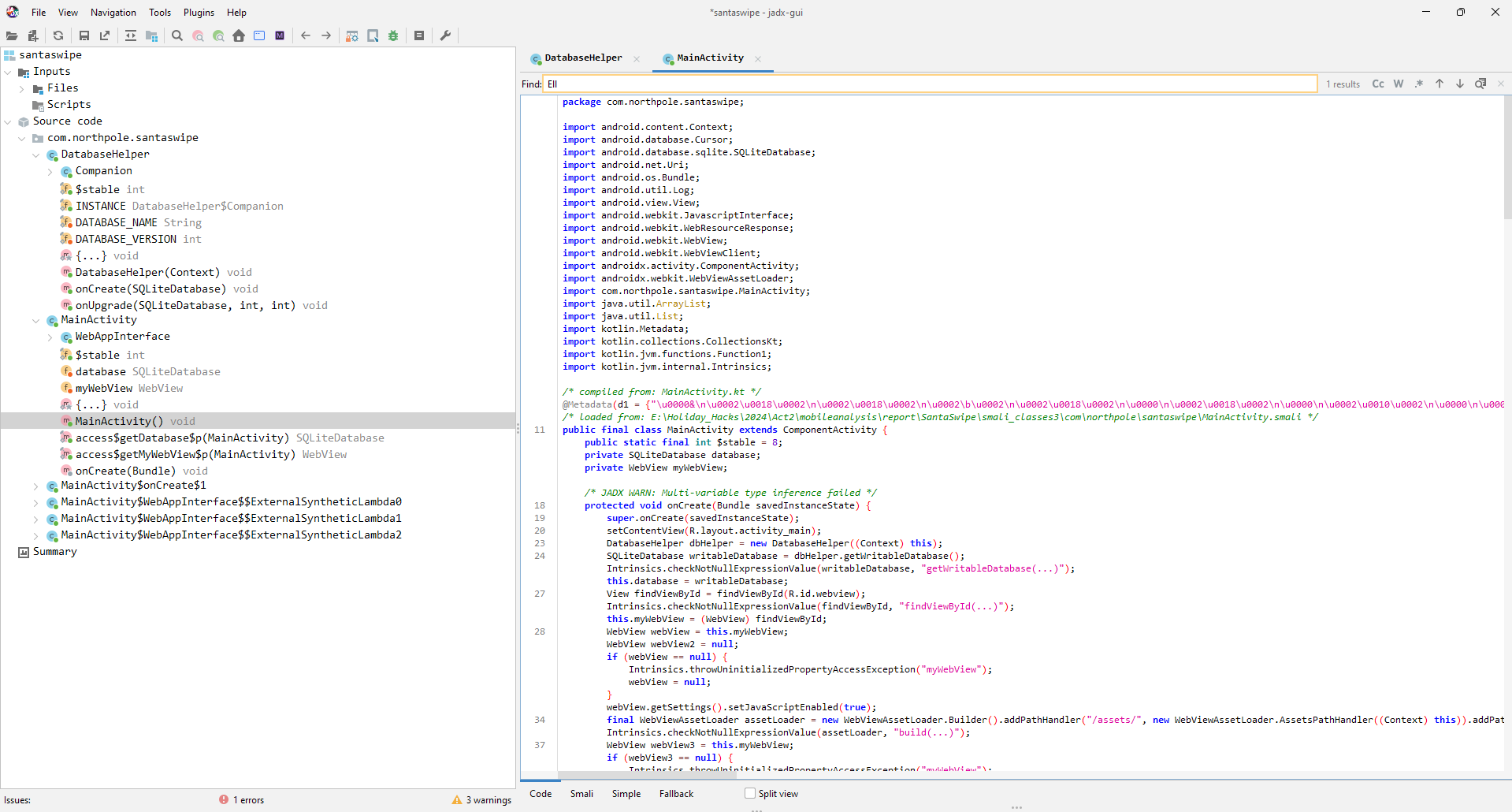
The file that I found to be interesting is MainActivity. MainActivity has code that explicitly excludes a name from the list. Take a look at the function "getNormalList".
public final void getNormalList() {
	final String jsonItems;
	try {
		SQLiteDatabase sQLiteDatabase = MainActivity.this.database;
		if (sQLiteDatabase == null) {
			Intrinsics.throwUninitializedPropertyAccessException("database");
			sQLiteDatabase = null;
		}
		Cursor cursor = sQLiteDatabase.rawQuery("SELECT Item FROM NormalList WHERE Item NOT LIKE '%Ellie%'", null);
		List items = new ArrayList();
		Log.d("WebAppInterface", "Fetching items from NormalList table");
		while (cursor.moveToNext()) {
			String item = cursor.getString(0);
			Intrinsics.checkNotNull(item);
			items.add(item);
			Log.d("WebAppInterface", "Fetched item: " + item);
		}
		cursor.close();
		if (items.isEmpty()) {
			jsonItems = "[]";
		} else {
			jsonItems = CollectionsKt.joinToString$default(items, "\",\"", "[\"", "\"]", 0, (CharSequence) null, (Function1) null, 56, (Object) null);
		}
		MainActivity mainActivity = MainActivity.this;
		final MainActivity mainActivity2 = MainActivity.this;
		mainActivity.runOnUiThread(new Runnable() { // from class: com.northpole.santaswipe.MainActivity$WebAppInterface$$ExternalSyntheticLambda1
			@Override // java.lang.Runnable
			public final void run() {
				MainActivity.WebAppInterface.getNormalList$lambda$0(jsonItems, mainActivity2);
			}
		});
	} catch (Exception e) {
		Log.e("WebAppInterface", "Error fetching NormalList: " + e.getMessage());
	}
}
If you look carefully in "getNormalList" you will see that the code to retreive the names from the database explicitly excludes a name "Ellie" from the list!
SELECT Item FROM NormalList WHERE Item NOT LIKE '%Ellie%'Submit the name "Ellie" into the objective on your badge to get the Silver trophy for this objective.
The next step is to find the excluded name from the obfuscated release version of the SantaSwipe application. This file is in a format called an "Android App Bundle" also known as a "aab" file. If I want to get at the APK file inside the bundle I will first need to extract the APK files. I did this using a tool called bundletool.
java -jar bundletool-all-1.17.2.jar build-apks --bundle=SantaSwipeSecure.aab --output output.apks --mode=universalThe outcome of the bundletool is that the extracted APK files are put into an archive "output.apks". I used 7-Zip to extract this and inside there was an APK named "universal.apk". I renamed this to "SantaSwipeSecure.apk" so I could remember what file I was dealing with. From here I can decompile the APK as before using apktool and then view the source with jadx-gui.
Again there are some interesting classes including one called DatabaseHelper. This class has a function to create the database: "onCreate".
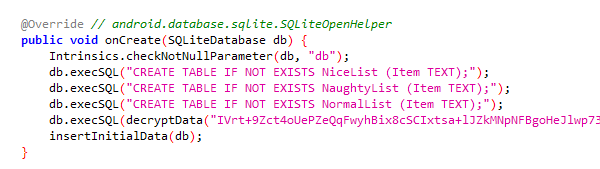
The above image shows that the database is executing a base64-encoded query that is encrypted. To view the contents of this query I needed to locate the "decrypt" method in the decompiled source.
private final String decryptData(String encryptedData) {
	try {
		Cipher cipher = Cipher.getInstance("AES/GCM/NoPadding");
		cipher.init(2, this.secretKeySpec, new GCMParameterSpec(128, this.iv));
		byte[] doFinal = cipher.doFinal(Base64.decode(encryptedData, 0));
		Intrinsics.checkNotNull(doFinal);
		return new String(doFinal, Charsets.UTF_8);
	} catch (Exception e) {
		Log.e("DatabaseHelper", "Decryption failed: " + e.getMessage());
		return null;
	}
}
The decrypt function specifies the encryption algorithm and scheme as "AES/GCM/NoPadding". The only other data required for the decryption is the Initialization Vector (IV) and the secret key. These values are global variables in the MainActivity class.
In the decompiled source, these values are not written in plain text. They are stored in a resource file that I needed to locate. apktool places these resource files at the path "/res/values/strings.xml".
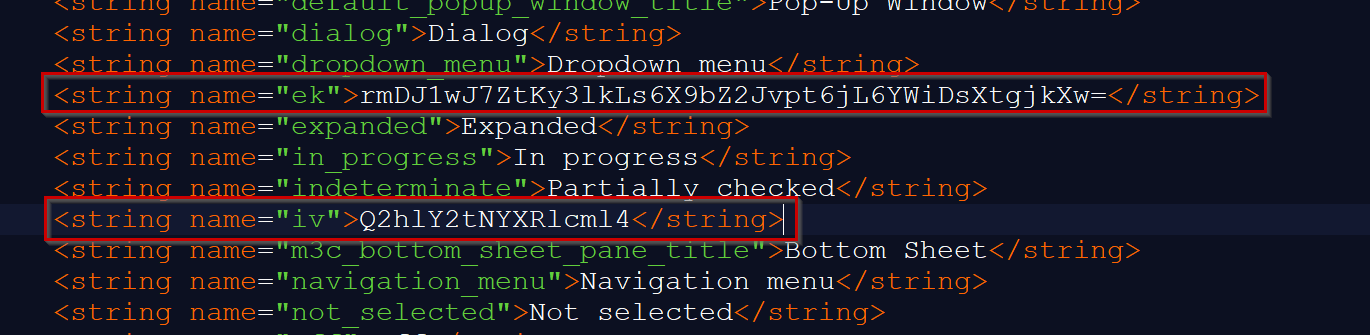
The encryption key and iv are the base64 encoded values "rmDJ1wJ7ZtKy3lkLs6X9bZ2Jvpt6jL6YWiDsXtgjkXw=" and "Q2hlY2tNYXRlcml4" respectively
To do the actual decryption, I created a Java program that is a slightly modified version of the "decrypt" function from the APK. I just hardcoded the encrypted query, IV, and encryption key.
import javax.crypto.Cipher;
import javax.crypto.spec.GCMParameterSpec;
import javax.crypto.spec.SecretKeySpec;
import java.util.Base64;
import java.nio.charset.StandardCharsets;
import java.io.BufferedReader;
import java.io.FileReader;
import java.io.IOException;

class SantaSwiperPrint{

	static byte[] iv = Base64.getDecoder().decode("Q2hlY2tNYXRlcml4");
	static String ek = "rmDJ1wJ7ZtKy3lkLs6X9bZ2Jvpt6jL6YWiDsXtgjkXw=";
	static SecretKeySpec secretKeySpec = new SecretKeySpec(Base64.getDecoder().decode(ek), "AES");
	static Cipher cipher;
	static String query = "IVrt+9Zct4oUePZeQqFwyhBix8cSCIxtsa+lJZkMNpNFBgoHeJlwp73l2oyEh1Y6AfqnfH7gcU9Yfov6u70cUA2/OwcxVt7Ubdn0UD2kImNsclEQ9M8PpnevBX3mXlW2QnH8+Q+SC7JaMUc9CIvxB2HYQG2JujQf6skpVaPAKGxfLqDj+2UyTAVLoeUlQjc18swZVtTQO7Zwe6sTCYlrw7GpFXCAuI6Ex29gfeVIeB7pK7M4kZGy3OIaFxfTdevCoTMwkoPvJuRupA6ybp36vmLLMXaAWsrDHRUbKfE6UKvGoC9d5vqmKeIO9elASuagxjBJ";

	public static void main(String args[]){
		BufferedReader reader;

		try{
			cipher = Cipher.getInstance("AES/GCM/NoPadding");
			cipher.init(2, secretKeySpec, new GCMParameterSpec(128, iv));

			System.out.println(decryptData(query));
			System.out.println(decryptData("KGfb0vd4u/4EWMN0bp035hRjjpMiL4NQurjgHIQHNaRaDnIYbKQ9JusGaa1aAkGEVV8="));
		}catch (Exception e){
			System.err.println("Bad Key");
		}
	}

	public static String decryptData(String encryptedData) {
		try {
			byte[] doFinal = cipher.doFinal(Base64.getDecoder().decode(encryptedData));
			return new String(doFinal, StandardCharsets.UTF_8);
		} catch (Exception e) {
			System.out.println("Decryption failed: " + e.getMessage());
			return null;
		}
	}
}
The outcome of the of the decrypt program is a trigger that deletes a specific name from the database if it's inserted. The only issue is the name is also a base64 encrypted value, so I hardcoded this value to be decrypted and printed out as well.
CREATE TRIGGER DeleteIfInsertedSpecificValue
    AFTER INSERT ON NormalList
    FOR EACH ROW
    BEGIN
        DELETE FROM NormalList WHERE Item = 'KGfb0vd4u/4EWMN0bp035hRjjpMiL4NQurjgHIQHNaRaDnIYbKQ9JusGaa1aAkGEVV8=';
    END;

Joshua, Birmingham, United Kingdom
Joshua from the UK is the name excluded from SantaSwipeSecure. Enter "Joshua" in your badge for this objective to get the Gold trophy!
| Hardware Hacking 101 | Where to next? | Drone Path |
Holiday Hack Challenge 2024 Report - Cody Travis <cody@chillaspect.com>